
How to Setup Database in Cloud Hosting?
Setting up database is one of the most important steps when starting a website or application. If you are running a business website or a web application, your data has to be stored in a safe location and accessed quickly.
With cloud hosting, database set up became easy, flexible and scalable. Businesses that use cloud hosting India solutions are able to manage their databases without worrying about hardware limits.
In this blog we will learn how to setup a database in cloud hosting in a simple and practical way.
Choose the Right Type of Database First
Before you go about creating a database, you have to decide which type of database suits your project.
Common options include:
- MySQL (for websites and CMS)
- PostgreSQL (for advanced applications)
- MongoDB (for flexible data storage).
Most of the cloud hosting services supports multiple database options so that you can select based on your needs.
Access Your Cloud Hosting Dashboard
Once you buy cloud hosting, you will receive access to some sort of control panel or dashboard.
From here, you can:
- Create databases
- Manage users
- Set permissions
This dashboard is available in most cloud hosting plans, including both beginner and advanced setup.
Create a New Database
Inside your hosting panel, you will find a database section.
Steps usually include:
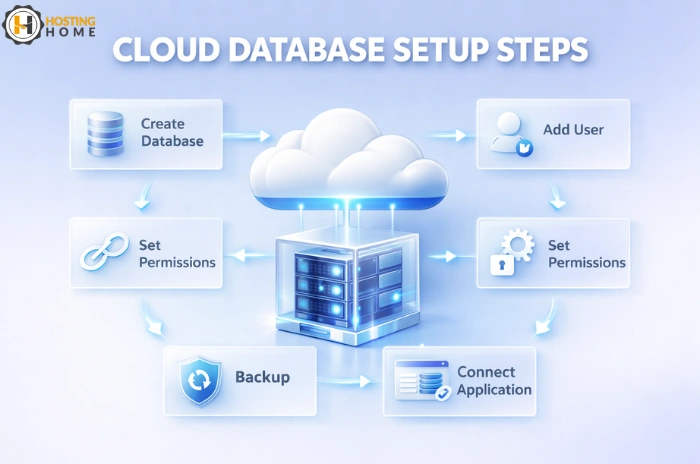
- Click on “Create Database”
- Enter database name
- Choose database type
- Save settings
This process is something that is simple whether you are using cheap cloud hosting India or premium services.
Add a Database User and Set Permissions
After creating a database, you need to assign user.
This step is to make sure that only the authorized people are allowed to access the data.
You can:
- Create a username
- Set a strong password
- Set permissions (read, write, full access)
This is an important step for security in any cloud server hosting environment.
Connect the Database with Your Application
Once your database is ready you need to connect it with your website or application.You will use:- Database name
- Username
- Password
- Host address
Use Backup Option for Data Security
Data safety is very important.Most of the best cloud hosting platforms provide automatic backups. You should have this feature enabled for avoiding loss of data.Backup options help you:- Restore data quickly
- Recover from errors
- Preserve business information
Optimize Database Performance
After setup you should also optimize your database.Simple tips include:- Remove unused data
- Use indexing for faster queries
- Monitor database usage
Test Database Before Going Live
Before you launch your website, test your database always.Check:- Connection status
- Data storage
- Query performance
Scaling Database with Cloud Hosting
One of the biggest benefits of cloud hosting is scalability.As your business grows, you can:- Increase storage
- Upgrade performance
- Handle more traffic
Choosing the Right Cloud Hosting Plan
The right plan depends on your needs.While choosing a plan, Consider:- Storage capacity
- RAM and CPU
- Backup options
- Support services
Why Choose Hosting Home for Cloud Hosting
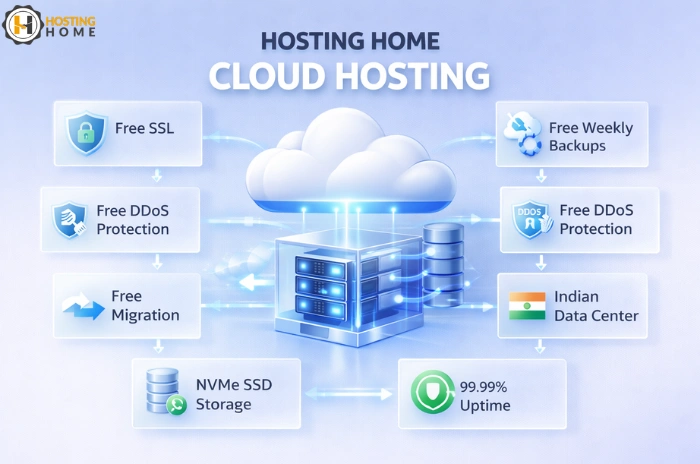
If you are planning to buy cloud hosting in India, Hosting Home offers reliable and high-speed cloud servers.Hosting Home Cloud Hosting Features:
- High-speed cloud hosting infrastructure
- Flexible and affordable cloud hosting plans
- Competitive cloud hosting prices
- Secure cloud server hosting environment
- Free SSL certificates
- Free weekly backups
- Free DDoS protection
- Free migration support
- 99.99% uptime guarantee
- Free 24/7 Dedicated WhatsApp support
- Scalable cloud solutions for growing businesses
Hosting Home is one of the trusted cloud hosting service provider that provide reliable services for websites and applications.
If you are looking for best cloud hosting in India, Hosting Home offers the performance, security and full support for your business in 2026.